
Appearance
Website chat widget
A Chat on WhatsApp button for your own website. A visitor taps it, reads your greeting, and WhatsApp opens with a short message ready to send. When the message arrives, Desorix records which page and which campaign the chat came from.
Owners and admins set it up under Website widget in the sidebar. It's part of Desorix; no module is needed.
Set it up
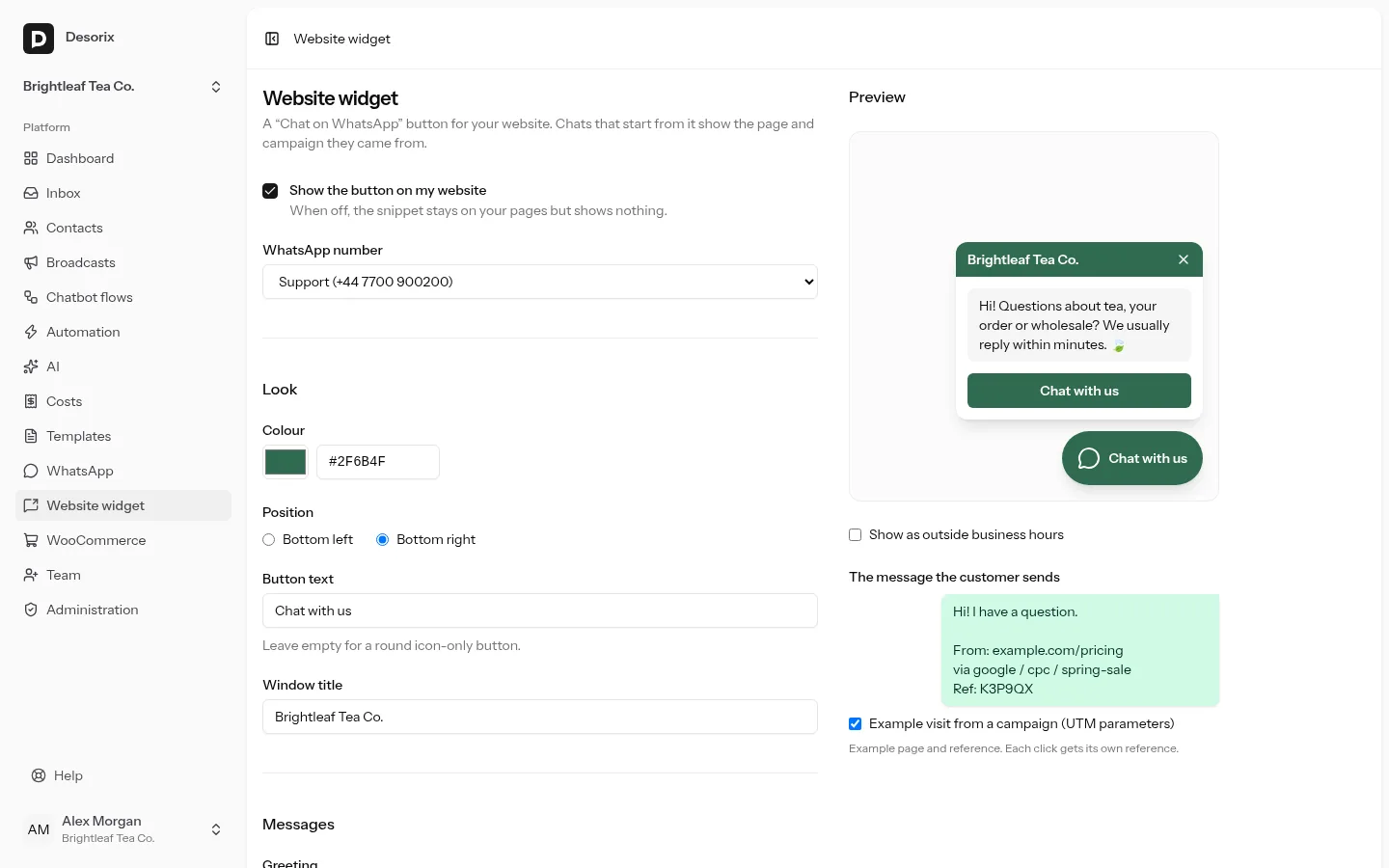
- Open Website widget, tick Show the button on my website and choose the WhatsApp number it opens.
- Choose a colour, bottom left or bottom right, the button text (leave it empty for a round icon), the window title and the greeting.
- Outside business hours: this message replaces the greeting when you're closed. It uses the business hours and the away switch under Automation.
- Prefilled message: what the customer's WhatsApp is filled with. The preview on the right shows exactly what they'll send.
- Optional: Tag the contact and Assign to apply to new chats from the widget. The tag goes on the contact and the conversation; assignment only happens when nobody has the conversation yet.
- Optional: Allowed websites. With a list, the button only appears on those domains and their subdomains.
- Save, then copy the snippet and paste it before
</body>on every page, or into your site builder's "custom code" or "footer scripts" box. It's one line:
html
<script>(function(d){function l(){var s=d.createElement("script");s.async=true;s.src="https://desorix.example.com/widget.js";s.setAttribute("data-key","wk_...");d.body.appendChild(s)}d.readyState==="complete"?l():window.addEventListener("load",l)})(document)</script>It loads the widget only after your page has finished loading, so a slow Desorix server can never delay your page. If your site's Content Security Policy blocks inline scripts, use the plain tag instead (and allow your Desorix address in script-src and connect-src):
html
<script async src="https://desorix.example.com/widget.js" data-key="wk_..."></script>On WordPress, use the Desorix Chat Button plugin instead.
What the customer sends
Hi! I have a question.

From: example.com/pricing
via google / cpc / spring-sale
Ref: K3P9QX- The From line is the page without its query string.
- The via line appears only when the page address has UTM parameters (
utm_source,utm_medium,utm_campaign). - Ref is a new 6-character code for every click. It links the chat to the click.
- The words "From", "via" and "Ref" can be changed under Words used in the message, for example for another language. "via" must be one word.
- Untick Add the page and campaign to the message to send only the greeting and the Ref line.
What Desorix records
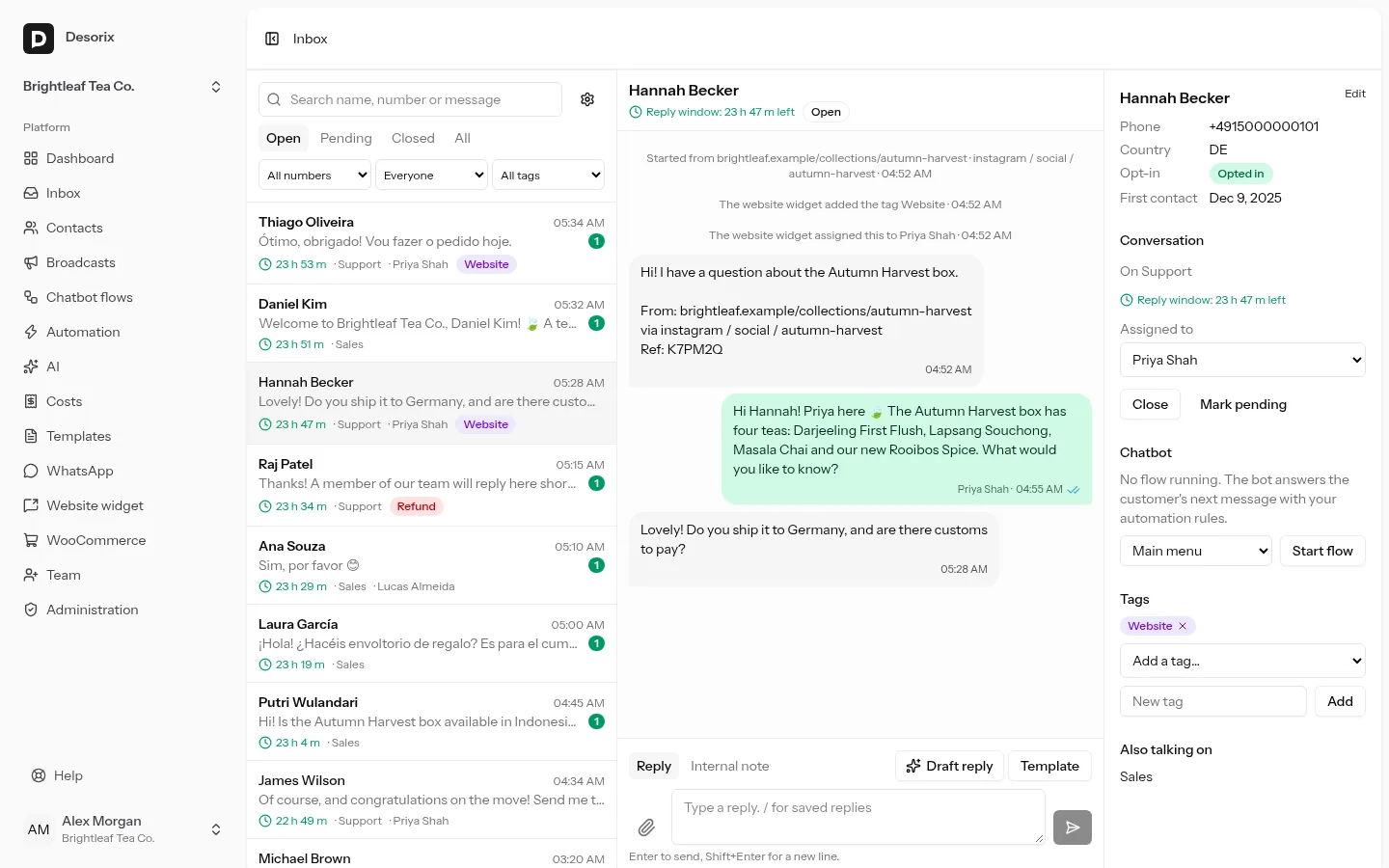
When the button is clicked, the widget sends Desorix the page (without its query string), the host of the previous site (for example google.com, never the full address) and the UTM parameters. It stores no IP address and sets no cookie.
When the customer's message arrives:
- The conversation gets a first line: Started from example.com/pricing · google / cpc / spring-sale.
- The contact gets the fields Source page, UTM source, UTM medium and UTM campaign. They keep the first visit and are never overwritten. Desorix creates these fields the first time; they can be renamed but not deleted.
- The widget's tag is added to the contact and to the conversation, shown as The website widget added the tag … at the time of the message. The assignee is applied if nobody has the conversation yet.
- If the click couldn't be recorded (an ad blocker, or Desorix was unreachable), the chat is still attributed from the lines in the message.
Each Ref is counted once, so a resent or forwarded message isn't counted again. Clicks are kept for 13 months, for the Chats by source report on the dashboard.
Remember the campaign while the visitor browses (off by default) keeps the landing page's UTM parameters in the browser tab's session storage, so a click on a later page still counts for the campaign. Session storage is cleared when the tab closes, but in the EU it's treated like a cookie: check your cookie policy before switching it on.
If Desorix is down
The widget never delays or breaks your page:
- The snippet loads the script only after your page has loaded.
- The script waits at most 3 seconds for its settings.
- If Desorix is down, slow or returns an error, the button simply doesn't appear, and the widget writes nothing to the browser console. The browser itself may note the failed request in its developer tools, as it does for any unavailable file.
- Everything runs in its own Shadow DOM, so your theme's CSS can't break the button and the button can't change your page.
- Once the button is showing, it's a plain WhatsApp link: the chat opens even if Desorix can't record the click.
Troubleshooting the widget
- No button: check that Show the button on my website is ticked and a number is chosen, the domain is in Allowed websites (or the list is empty), and the snippet is on the page. Opening
https://your-desorix/widget/wk_....jsonin the browser shows"enabled": truewhen all is well. - No button on a test page opened as a file (
file:///…/test.html): browsers give a page opened from disk no web address (its origin is "null"), and they block or restrict its requests to other sites, so the widget can't load its settings. Serve the page from a web server instead. Any website works, or on your computer runpython3 -m http.server 8080in the file's folder and openhttp://localhost:8080/test.html. To test from a phone, use your computer's network address (for examplehttp://192.168.1.20:8080/test.html). Chats from such test pages show the IP address as the page. - Chats have no source: the customer deleted the lines before sending, or the chat was started without the button.
- After "Create a new key", the old snippet shows nothing. Replace it on your website (or in the WordPress plugin).
The Chats by source report on the dashboard counts chats by campaign, page or referring site over 7, 30 or 90 days, with a CSV export.